
UX/UI Redesign Update
Secure App by Cox Automotive
What is the Secure app?
The Secure app is an essential tool developed by Cox Automotive specifically for technicians working at Manheim body shop locations. Designed to streamline and enhance the vehicle check-in and check-out process, Secure enables technicians to efficiently document and track every vehicle that enters or leaves the Manheim bodyshop. This ensures accurate record-keeping, reduces processing times, and minimizes potential errors in the vehicle handling workflow.
By centralizing all check-in and check-out activities, the Secure app contributes to operational efficiency and enhances security within Manheim's body shop facilities.
Business Problem:
-
Task Efficiency: Technicians use the app for regular tasks, but it’s not fully optimized, leading to slower processing and higher operational costs.
-
Limited Flexibility: Users see opportunities for expanded functionalities, suggesting that the app doesn’t fully support evolving bodyshop needs.
-
Usability Issues: General feedback highlights usability challenges, impacting productivity and increasing the risk of errors.
Business Objectives:
-
Enhance Task Efficiency: Streamline the check-in and check-out process to reduce processing times, improve workflow, and lower operational costs.
-
Expand App Capabilities: Introduce new features and improve flexibility to meet the evolving needs of bodyshop technicians and support additional use cases.
-
Improve User Experience: Address usability feedback to create a more intuitive, user-friendly interface, enhancing technician productivity and reducing error rates.
-
Increase User Adoption: Boost engagement and satisfaction among technicians by making the app indispensable for daily operations at Manheim bodyshops.
Scope of UX Engagement:
-
User Role Analysis: Identify and document the responsibilities and workflows of team members who use the Secure app for vehicle check-in and check-out to better align the app’s functionality with their daily tasks.
-
Process Variance Mapping: Capture points where users frequently deviate from standard workflows, along with the reasons and impacts of these deviations, to identify potential areas for improvement or flexibility in the app’s design.
-
Pain Point Discovery: Conduct user research to uncover specific challenges or frustrations that users experience while using the Secure app, particularly those that hinder efficiency and accuracy.
-
Improvement Opportunities: Gather insights on features or changes that current users would like to see, focusing on key areas that could enhance usability, streamline processes, and support technicians’ evolving needs.
Target Audience:
Technicians located at the gates of the Cox Automotive body shops.
PROBLEM DISCOVERY
User Interviews:
To gain an understanding of the responsibilities and processes of employees responsible for vehicle check-in, and identify key pain points by using the Secure app, we conducted 1:1 Interviews 30-minute semi-structured remote moderated sessions with 9 participants from various locations, years of experiences, and positions.
Locations:
Riverside, Orlando, Harrisonburg, Philadelphia
Experience in current role:
45 days – 8 years
Average experience:
3 years
Job positions:
Vehicle Entry Check-In Clerk (4), Mobile Coordinator (1), Quadrant Coordinator II (1), VP Supervisor Vehicle Entry, Vehicle Photographer (2), Supervisor Inspections (1)
UX Discovery Process:
Interview → Analyze Data → Organize Results→ Jobs To Be Done → Report
FINDINGS
Vehicle check-in process

Range of 30 seconds – 3 minutes to complete vehicle check-in.
Varies by experience and glitches
Overall Findings
-
Record Creation and Editing: New records in Secure are only started when a new vehicle arrives. All other instances involve editing an existing record. New vehicle entries are time-consuming as all information needs to be manually entered.
-
Platform Usage for Restocks: Vehicle restocks must be done in Velocity, as Secure does not support creating new records; users can only use AS400 for restocks if the vehicle hasn’t left the lot, and entering the VIN in Secure only brings up the current record without an option for new entry, complicating the process.
-
Record Edits for Specific Scenarios: In some locations, records are only edited when a vehicle leaves and returns from a satellite lot or if there is a change in the dealer ID.
-
Dealer Number Challenges: When the dealer number is unavailable, it’s entered as "unknown," requiring commercial dealers to identify the correct dealer later. This creates additional work across departments, slowing down the restocking process.
-
Key Data Priorities: Client information, dealer number, mileage, and details (condition report, pictures, etc.) are considered most important by users.
-
Participant Skips and Challenges: Seven out of nine participants reported skipping the damages screen; one Vehicle Check-in Clerk skips the license plate field during busy check-ins; another stated they cannot skip steps as the app won’t allow it; and one Quadrant Coordinator skips the step before location and after services due to uncertainty about what to input.
-
Limited Secure Usage by New Employees: One participant, who has been with Manheim for only 45 days, does not use Secure for vehicle check-ins and relies solely on Velocity. It’s unclear if this is due to a lack of training on Secure.
-
Mobile Sales in AS400: Mobile sales continue to be processed in the AS400 system due to Secure’s limitations.
-
Role-Specific Limitations: The Quadrant Coordinator II lacks the ability to enter specific options and cannot input “B” for Business Unit, limiting task completion in Secure.
Likes From The Current Experience
-
Can scan the vehicles because the PT didn't scan very well. Makes the process faster as they don't have to type in the VIN
-
Don't have to type in the color - compared to PT had to type everything in
-
Efficient and fast when Wi-Fi is working
-
Not having to enter all the options or enter the subseries when it's pre-populated
-
Not having to carry around PT anymore - equipment smaller and lighter. Makes the process better for them and faster
Dislikes From The Current Experience
-
Wi-Fi is an issue for all locations and causes glitches with the app
-
Kicks them out of the app after 10-15 mins and they have to log in again (Occurs a few times a day)
-
Have to clear data 2-3 times a day because it takes so long to load if they don’t
-
App freezing
-
Not being able to change the defaults that are pre-populated on dealer cars. This causes check-in to take a long time when there is an issue with the defaults
-
The app doesn’t tell them if a car is sold
"Particularly Mondays I'm in here and I’m going through and scanning a lot and marking cars to get ready to line up for the sales. If a car is actually sold and it's still sitting there from last week's auction, it should come up with sold on the screen. Then I could put a big S on the windshield and put the wiper blade up and the drivers would take it away to the sold cars as they're supposed to. It just tells me it's not in the sale. I don't know if it's not in sale because they're not running it again, or they're going to wait a couple of weeks. Or it's not in the field because it's sold and it just needs to be moved back to the old cars. That would help me a lot." - Vehicle Photographer
PAIN POINTS WITH SECURE
-
Sticker Printing Process: Each location must print stickers for every vehicle checked in, which can be time-consuming and cumbersome.
-
Printer Issues: Technicians frequently encounter problems with printers, including paper jams that cause label stock to get stuck, resulting in illegible text on the stickers. Printers also overheat and stop functioning, requiring technicians to turn them off to cool down before restarting and reconnecting to the TC75 device.
-
Trackers Slow Down the Process: The use of trackers significantly slows down vehicle check-ins, with one technician noting that without the tracker, they could complete a check-in in 20 seconds, but it currently takes about one minute.
-
Transporter Confusion: Transporters often do not know which accounts the vehicles are associated with, leading to delays in the check-in process as they wait for clarification.
-
Client Attitudes: Some clients exhibit negative attitudes and are reluctant to exit their vehicles while check-in clerks install trackers using the ODB ports, causing further delays in the process.
-
Device Reliability Issues: The devices used are not reliable, with the app frequently freezing. Technicians must go into settings to clear data/cache multiple times throughout the week, sometimes even multiple times a day.
-
Incorrect Gate Location: The gate location is incorrect about 5% of the time, complicating the check-in process.
-
Inaccurate Year Information: The app often displays the wrong year for Freightliner International trucks, leading to potential errors in record-keeping.
-
Session Timeouts: The app kicks users out after 10-15 minutes of inactivity, requiring them to log in again and clear data 2-3 times a day due to the lengthy login process.
-
VIN Reading Issues: The app struggles to read VIN numbers on new model vehicles, including F150s, Jaguars, Range Rovers, and Infiniti QX30s. This may be due to the background color being white instead of black, which slows down the process by approximately 1.5 minutes.
-
Showroom Designation Challenges: Technicians must change the Showroom designation to "I7" on dealer cars, adding an extra step to their workflow.
-
Limited Data Entry Options: For dealer cars that do not have a condition report (CR), the app only allows the selection of manual/automatic transmission and type of top. It does not permit entry of engine or motor specifications, limiting the information that can be recorded.
-
Slow Wi-Fi Connection: Wi-Fi connectivity issues contribute to delays in the check-in process, causing frustration for technicians.
-
App Performance Issues: The app sometimes exhibits performance problems, such as a spinning wheel that indicates it is processing, which can further delay tasks.
-
Device Overheating: Devices overheat if multiple apps are open simultaneously, leading to shutdowns. Technicians must wait for the devices to cool down and restart, which happens at least once a day at the Riverside location.
-
Ineffective Cleaning Solutions: The cleaning device typically used to resolve printer issues has proven ineffective, leading to ongoing printing problems.
-
Limited Printing Capacity: Check-in clerks desire the ability to print multiple stickers at once, which would significantly reduce check-in time and improve workflow efficiency.
"Defaults right now are probably costing me 25% of our day because they are defaulted to the wrong things. If it's a leased car, it's perfect because the defaults work and they save you a lot of time, but on dealer cars it doesn't work that way because all dealers don't want the same thing. When it defaults to something, the system isn’t flexible enough to allow us to change it. Not being able to make corrections is a really big problem. But not because mistakes are being made, it’s the defaults that are driving the corrections." – Vehicle Photographer
"I still use AS400 for mobile sales because of the limitations with Secure. It doesn't have the ability to put options in and can't put in the "B" for the Business Unit." – Quadrant Coordinator II
OPPORTUNITIES
-
Streamlined VIN Entry: Enable team members performing vehicle check-ins to enter the last six digits of the VIN without requiring manager approval. This would reduce frustration from the current workaround of switching between Velocity and manually entering the entire VIN.
-
Simplify Dealer Car Processes: Remove unnecessary Showroom options for dealer cars to streamline the check-in process and prevent issues related to record edits that occur when cars are checked in as Showroom.
-
Edit Default Options on Dealer Cars: Allow users to make edits to defaulted options on dealer cars to ensure accurate record-keeping and improve workflow efficiency.
-
Enhance TC75 Device Utilization: Provide multiple TC75 devices at locations to improve performance and reduce bottlenecks caused by using a single device for both Secure and Velocity applications.
-
Improve Printing Solutions: Develop more reliable printers and provide a solution to the paper jam issue to minimize delays caused by illegible stickers and ensure a smoother printing process.
-
Address App Performance Issues: Optimize the app to reduce freezing and session timeouts, improving reliability and user experience. This includes allowing technicians to remain logged in for longer periods and minimizing the need to clear data/cache.
-
Upgrade Device Hardware: Invest in higher-performance devices to prevent overheating and improve overall functionality, especially when multiple apps are in use.
-
Enhance Wi-Fi Connectivity: Improve the Wi-Fi infrastructure at locations to reduce connectivity issues that contribute to delays during the check-in process.
-
Improve Tracker Installation Process: Streamline the process for installing trackers to minimize client reluctance to exit their vehicles and reduce check-in times.
-
Training on App Features: Provide thorough training for staff on the app’s features and processes to reduce confusion and improve efficiency, particularly for new employees.
Current App Satisfaction Rating
7.6/10
WHAT I DID
Analyzed Findings
Conducted a thorough analysis of findings from the UX research to identify key insights and areas for improvement in the Secure app.


Design Solution
Sign In
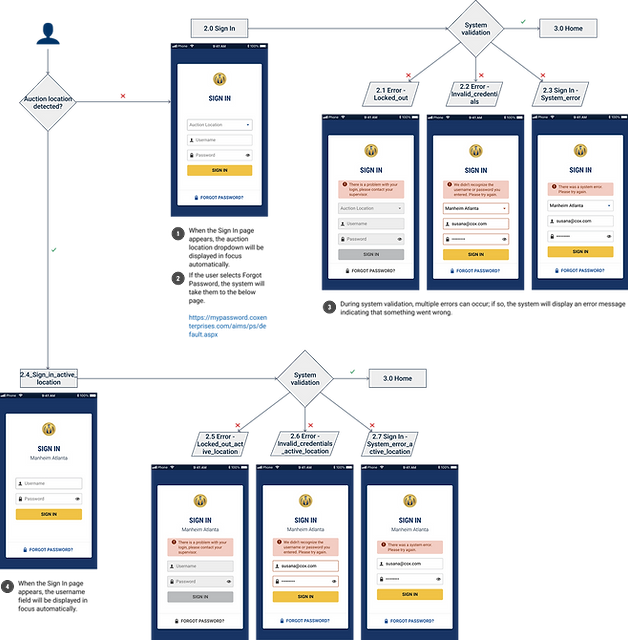
The app must allow users to sign in by selecting their auction location, username, and password. During the system validation process, various errors may occur such as invalid credentials, system or connection errors, and exceeding the maximum sign-in attempts. In such cases, the system will display an error message indicating that something has gone wrong.
Improving Vehicle Check-In with Predefined Settings
To streamline the vehicle check-in process, the application setup now features predefined options for sign-in, gate selection, and printer configuration. These settings will be displayed for first-time users and can be easily modified in the app's settings and preferences at any time.
Gate Selection
First-time users are required to select their assigned default gate, which will be the designated entry point for vehicles entering the body shop. This selection can be easily modified later in the app's settings and preferences page.


Printer Selection
Users are required to select their default printer for sticker printing after each vehicle is checked in. During the system validation process, various errors may occur, such as connection issues or invalid printer IDs. In these instances, the system will display an error message indicating that something has gone wrong.


Select VIN Option
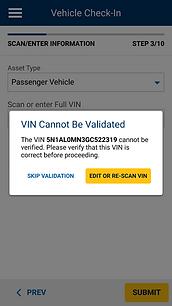
Users can initiate the check-in process by entering the full VIN, a partial VIN, the work order number, or by omitting the VIN altogether by selecting the work order number.

Full VIN


Partial VIN

No VIN

Work Order


Vehicle Information
Under normal conditions, when the user scans or types the VIN on the previous step, the vehicle information (Year, Make, Model, Trim, and Vehicle Body) should be pre-populated. This screen is shown in this way; the user only has to check that the information matches the vehicle in front of him and continue with the process.
The user can consult the vehicle information (Year, Make, Model, Trim, Body, VIN, and WO) by touching the Information icon in the header.

Scan Tracker
The button on this screen will change to "Skip" since entering Tracker ID information is optional. If a Tracker ID is added successfully, the system will confirm the action, and the user can click the "OK" call-to-action (CTA) to proceed to the next step.
If the Tracker ID is invalid, the system will notify the user. In this case, the user must enter a valid Tracker ID or click "Skip" to move on to the next step in the process.


Lot Destination
Users must select a Lot Destination for each vehicle. The system will display search results or auto-complete suggestions, allowing the user to choose a result, which will automatically send them to the next step.


Vehicle Damage
In this step, users must document any damage found on the vehicle. They can enter damage details in the mandatory input field. The "Add" button remains disabled until this field is filled.
If the user attempts to proceed without entering a description, an error message will appear, highlighting the required field in red.
Users can add multiple damage entries, each appearing as a new line when selecting the "Add" button. They can also remove an entry by selecting the "Remove" button.
Vehicle Problems
In this step, users are taken to the Selected Problems screen. The "Save Changes" button remains inactive until a problem is selected.
If no problems are selected, users can close the modal and return to the previous screen. Once a problem is selected, the "Save Changes" button becomes active, allowing users to save their progress and proceed to the next step.
Users can always add additional problems or modify their selection as needed.


Vehicle Services
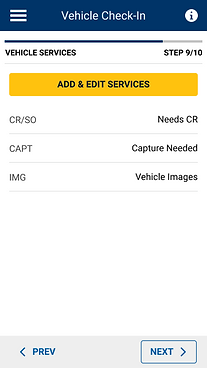
On this screen, users can view the services automatically selected by the system. They also have the option to add more services or modify the selected ones by tapping the "Add & Edit Services" button.


Submit Vehicle Check-In
Users can review all entered information and make edits as needed. Once all steps of the Vehicle Check-In process are completed, they will be prompted to submit the order.
Confirmation
The system displays this success message to confirm that the user has successfully completed the check-in process.

USABILITY TESTING
PARTICIPANTS
We interviewed 11 Manheim employees who use Secure to check in vehicles at Manheim lots
Locations:
Manheim Phoenix and Nashville
Experience in current role:
1.5 - 22 years
Job positions:
Vehicle Entry Check-In Clerk (6), Supervisor Inspections (2), Security Team (3).
OVERALL
Overall Performance & User Perception:
The usability metrics showed a positive trend, with UX Lite, Ease, and Satisfaction scores exceeding industry averages. Clerks responded positively to the prototype, noting that it felt familiar and closely aligned with the current workflow.
Key Strengths:
-
The UI was intuitive and well-received, making adoption smoother.
-
Edit mode was particularly appreciated, especially from the Review page.
-
Users valued the ability to adjust preferences within the flow, enhancing flexibility.